
---
For the vast majority of Filipino online gamers, mobile accessibility is the deciding factor in overall user experience. The 49JILI Mobile App provides an optimized interface designed to minimize mobile data consumption, accelerate lobby load times, and deliver immediate access to real-money slots, live dealer tables, and cashout services on smartphones.
Because native real-money gaming applications are restricted on the Google Play Store and Apple App Store in the Philippines, players must install the official Android APK or configure an iOS Progressive Web App (PWA).
This guide delivers verified, step-by-step installation instructions for both platforms, highlights crucial security measures against malicious APK mirrors, and resolves common installation errors.
---49JILI Mobile Specifications & System Requirements
| Parameter | Android Application (APK) | iOS Mobile Web App (PWA) |
|---|---|---|
| Distribution Method | Direct APK Package Download | Safari "Add to Home Screen" Web App |
| Operating System | Android 8.0 (Oreo) or later | iOS 14.0 or later |
| Storage Space Required | ~25 MB to 45 MB | Less than 5 MB (Cached asset shell) |
| RAM Requirement | Minimum 2 GB (3 GB recommended) | Compatible with iPhone 8 and newer |
| Biometric Support | Device-level Fingerprint & Face Unlock | Apple Face ID / Touch ID Keychain |
| Auto-Update Mechanism | In-app prompt upon launch | Automatic live server-side sync |
Android Setup: How to Download and Install the 49JILI APK
Installing an APK package requires granting your mobile browser temporary permission to install software outside the Google Play Store. Follow this step-by-step walkthrough:
[ Step 1: Download APK ] ──► [ Step 2: Allow Unknown Apps ] ──► [ Step 3: Run Installer ] ──► [ Step 4: Launch App ]
Step 1: Download the Official Package
1. Open Google Chrome on your Android smartphone. 2. Navigate to the official 49JILI mobile portal. 3. Tap the "App Download" (o "I-download ang App") banner located at the top of the homepage or in the bottom navigation tray. 4. Tap "Download Android APK". Your browser will prompt: "File might be harmful. Do you want to download 49JILI.apk anyway?" 5. Tap "Download anyway". This standard Android warning appears for any application distributed directly rather than via Google Play.Step 2: Configure Android Installation Permissions
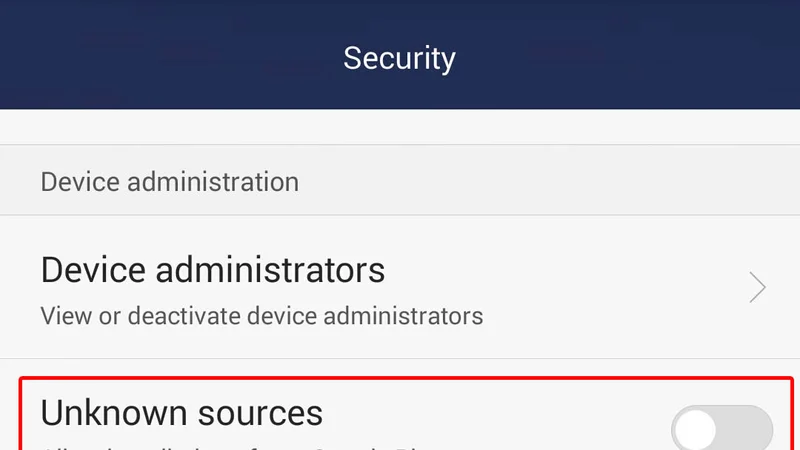
If this is your first time installing an APK through your browser, Android’s security protocol will block execution by default: 1. Tap "Settings" on the installation pop-up (or navigate to Settings > Apps > Special App Access > Install Unknown Apps). 2. Select your browser (e.g., Google Chrome). 3. Toggle on "Allow from this source".Step 3: Complete Package Installation
1. Pull down your notification shade and tap the completed `49JILI.apk` download notification (or locate it in your device's Downloads folder). 2. Tap "Install" on the prompt. 3. Android’s built-in Play Protect scanner will scan the package for malicious code. 4. Once installation is finished, tap "Open" to launch the 49JILI application. ---iOS Setup: How to Configure the 49JILI App on iPhone & iPad
Due to Apple’s App Store guidelines, real-money gaming APK files cannot be installed on iOS devices. However, you can install an official Progressive Web App (PWA) that runs in full-screen standalone mode without the Safari address bar, providing the exact look, feel, and performance of a native iOS application:
1. Launch the Safari browser on your iPhone or iPad (Note: Must use Safari, not Chrome or Firefox). 2. Visit the official 49JILI gaming website. 3. Tap the "Share" icon (the square with an upward arrow) located in the bottom Safari toolbar. 4. Scroll down through the options menu and select "Add to Home Screen" (o "Idagdag sa Home Screen"). 5. Label the shortcut "49JILI" and tap "Add" in the top-right corner. 6. The official 49JILI icon will now appear on your iPhone home screen. Tapping it opens the platform in an optimized, distraction-free full-screen environment.
---Security Safeguards: Avoiding Fake & Malicious APK Files
Because 49JILI is a popular gaming brand in the Philippines, fraudulent actors frequently create lookalike websites that distribute infected APK files designed to steal user passwords or compromise linked GCash wallets.
Protect your personal device by enforcing these security checks:
Download Only from the Verified Portal: Never download 49JILI APK files from unverified third-party file sharing blogs, social media chat groups, or Telegram channels. Inspect Requested App Permissions: The authentic 49JILI application requires minimal device permissions (Internet access and basic local storage caching). If an APK requests access to your Contacts, SMS inbox, Camera, or Accessibility Services, terminate the installation immediately and delete the file. Keep Play Protect Active: Never disable Google Play Protect on your Android phone. Play Protect will scan downloaded APKs against known malware signatures before allowing them to run. ---Troubleshooting Common Mobile Installation Errors
Error: "Parse Error / There was a problem parsing the package" Cause: The downloaded APK file is corrupt or was interrupted before completion, or your Android OS version is below 8.0. Fix: Delete the corrupted file from your Downloads folder, restart your smartphone, ensure a stable LTE/Wi-Fi connection, and redownload the complete package. Error: "App Not Installed" Cause: Insufficient device storage space or a conflicting previous version of the app is already installed. Fix: Free up at least 200 MB of internal storage and uninstall any older versions of the app before installing the fresh build. Error: "Blocked by Play Protect" Cause: Google Play Protect flags non-Play Store software. Fix: Tap "More Details" on the warning prompt and select "Install Anyway" only if you have verified that the file originated from the authentic 49JILI domain.
---Technical Specifications & Publication Metadata
Primary Keyword: `49jili app download apk` Secondary Keywords: `49jili apk android`, `49jili ios app`, `download 49jili mobile app`, `49jili app install guide` Internal Linking Recommendations: Contextual link to parent hub: 49JILI Brand & Mobile Portal Sibling spoke for accessing account: 49JILI Login & Recovery Guide Sibling spoke for account sign-up: 49JILI Registration Walkthrough Contextual link to e-wallet funding: 49JILI GCash Deposit Guide Authoritative External References: Google Android Security Documentation — Best practices for managing side-loaded APK packages and app permissions. Apple Developer Documentation — Progressive Web App standards and web view caching. Recommended Schema Markup: `Article` `SoftwareApplication` (Configured strictly with factual application metadata without fabricated ratings) `HowTo` `BreadcrumbList` Suggested Image Assets: Filename: `49jili-android-apk-download-prompt.webp` | Alt: Android browser prompt downloading official 49JILI APK file Filename: `49jili-ios-add-to-home-screen.webp` | Alt: Safari iOS step-by-step demonstration of adding 49JILI to home screen*
---Frequently Asked Questions
Is the 49JILI Android APK safe to install?
Yes. The official 49JILI APK file is digitally signed and free of malware or intrusive spyware. When downloading directly from the official portal, you are receiving the verified application package designed specifically for Android operating systems.Why does Android display a warning about installing from unknown sources?
Android displays a standard security prompt whenever an application is downloaded outside the Google Play Store. Because real-money gaming apps are distributed directly via official operator portals in the Philippines, you simply need to toggle "Allow from this source" in your phone's browser settings to complete installation.Can I install the 49JILI APK on an Apple iPhone or iPad?
No. APK files are executable packages designed exclusively for Android devices. iOS users can access the fully responsive 49JILI mobile platform by opening Safari, tapping the Share icon, and selecting "Add to Home Screen" to install the Progressive Web App (PWA).How do I update my 49JILI mobile application to the latest version?
When a core platform update is released, launching your installed app will automatically trigger an update prompt. Alternatively, you can visit the official mobile download page to download and install the latest APK file over your existing installation.Does playing on the mobile app consume significant data?
No. The mobile application caches core graphical assets, audio effects, and interface elements locally on your device. Only lightweight real-time bet validation and RNG seed data are transmitted across your cellular network, minimizing data consumption. ---Official 49JILI Access and Registration
For players ready to explore the certified game catalog, mobile APK downloads, and active promotional matches:
Verified Partner Link: Access the official 49JILI registration portal and cashier directly through our verified security gateway. New players are eligible for the 100% First Deposit Welcome Match and daily rolling rebates upon completing account setup.
👉 Visit Official 49JILI & Claim Welcome Bonus